


new
INTRODUCTION TO ESP32
1.1 Definition of ESP32
ESP32 is a low-cost microcontroller family with built-in Wi-Fi and Bluetooth capabilities.
It can be programmed to control electronic devices, read sensors, communicate over networks, and perform specific tasks.
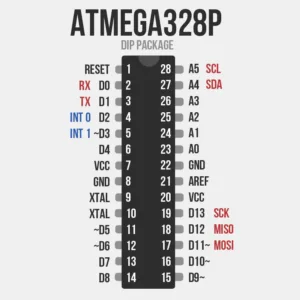
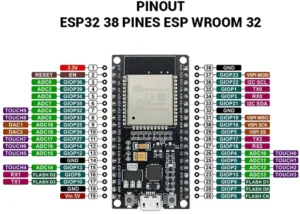
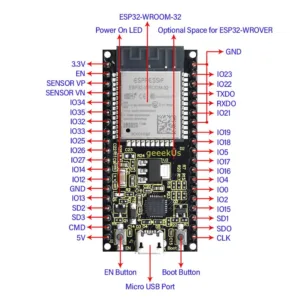
ESP32 Applications
- Smart lighting systems
- Automatic irrigation systems
- Temperature monitoring systems
- Security alarms
- Wi-Fi-controlled robots
- Smart door systems
- Home automation systems
- Internet-controlled devices
Main Features of ESP32
| Feature | Description |
|---|---|
| Microcontroller | Executes the program |
| Wi-Fi | Provides wireless network connectivity |
| Bluetooth | Allows short-range wireless communication |
| GPIO | Connects external electronic components |
| ADC | Reads analog signals |
| PWM | Controls devices such as LEDs and motors |
| USB Interface | Connects the board to a computer |
| Flash Memory | Stores the program |
| Timers | Performs time-based operations |
GPIO
GPIO stands for: General Purpose Input/Output
GPIO pins can be configured as either inputs or outputs.
Input
An input receives information from an external device.
Examples:
- Push button
- Temperature sensor
- Motion sensor
- Light sensor
Output
An output sends a signal to control an external device.
Examples:
- LED
- Buzzer
- Relay
- Motor
CONNECTING ESP32 TO A COMPUTER
Required Materials
- ESP32 development board
- USB data cable
- Computer
- Arduino IDE
Connecting the ESP32
The USB connection has three important purposes:
1. Supplying power to the ESP32.
2. Uploading programs to the ESP32.
3. Communicating with the ESP32 through the Serial Monitor.
USB Data Cable
Some USB cables are designed only for charging.
If the computer does not detect the ESP32, check whether the cable supports data transfer.
USB-to-Serial Driver
Depending on the ESP32 development board, the board may use a USB-to-serial chip such as:
• CP2102
• CH340
• CH9102
If the correct driver is not installed, the ESP32 may not appear as a COM port.
INSTALLING AND CONFIGURING ARDUINO IDE
Define arduino IDE
Arduino IDE stands for Arduino Integrated Development Environment.
It is software used to:
• Write programs
• Edit programs
• Compile programs
• Upload programs to microcontrollers
• Monitor serial communication
Main Parts of Arduino IDE
The Arduino IDE contains:
• Code editor
• Verify/Compile button
• Upload button
• Serial Monitor
• Board selection
• Port selection
Installing ESP32 Board Support
After installing Arduino IDE:
Step 1: Open Preferences
Go to:
File → Preferences
Step 2: Add ESP32 Board Manager URL
In Additional Boards Manager URLs, add the official ESP32 board package URL provided by Espressif.
Step 3: Open Boards Manager
Go to:
Tools→ Board →Boards Manager
Search for: ESP32
Install the ESP32 package provided by: Espressif Systems
Selecting the Port
Connect the ESP32 and select:
Tools → Port
Choose the COM port belonging to your ESP32.
ESP32 PROGRAM – BLINKING LED
Required Components
For an external LED:
• ESP32
• LED
• 220 Ω resistor
• Breadboard
• Jumper wires
Program
#define LED_PIN 2
void setup()
{
pinMode(LED_PIN, OUTPUT);
}
void loop()
{
digitalWrite(LED_PIN, HIGH);
delay(1000);
digitalWrite(LED_PIN, LOW);
delay(1000);
}
Button and LED Example
Program:
#define LED_PIN 2
#define BUTTON_PIN 4
void setup()
{
pinMode(LED_PIN, OUTPUT);
pinMode(BUTTON_PIN, INPUT_PULLUP);
}
void loop()
{
int buttonState = digitalRead(BUTTON_PIN);
if (buttonState == LOW)
{
digitalWrite(LED_PIN, HIGH);
}
else
{
digitalWrite(LED_PIN, LOW);
}
}
USING WI-FI WITH ESP32
One of the most important features of ESP32 is its built-in Wi-Fi capability.
Wi-Fi is a wireless communication technology that allows devices to communicate over a wireless network.
Connecting ESP32 to Wi-Fi
Example Program
#include
const char* ssid = “YOUR_WIFI_NAME”;
const char* password = “YOUR_WIFI_PASSWORD”;
void setup()
{
Serial.begin(115200);
WiFi.begin(ssid, password);
Serial.print(“Connecting”);
while (WiFi.status() != WL_CONNECTED)
{
delay(500);
Serial.print(“.”);
}
Serial.println();
Serial.println(“Wi-Fi Connected!”);
Serial.print(“IP Address: “);
Serial.println(WiFi.localIP());
}
void loop()
{
}
div style=”background-color:green;color:white;padding:25px;text-align:center;border-radius:8px;margin-bottom:25px”>
CONTROLLING A DEVICE USING A PHONE OR INTERNET
ESP32 Web Server
A web server allows the ESP32 to provide a webpage that can be accessed using a browser.
ESP32 Web Server Program
#include
#include
const char* ssid = “YOUR_WIFI_NAME”;
const char* password = “YOUR_WIFI_PASSWORD”;
WebServer server(80);
#define LED_PIN 2
void handleRoot()
{
String page = “”;
page += “”;
page += “”;
page += “
page += “”;
page += “”;
page += “
ESP32 LED CONTROL
“;
page += ““;
page += ““;
page += ““;
page += “
“;
page += ““;
page += ““;
page += ““;
page += “”;
page += “”;
server.send(200, “text/html”, page);
}
void turnOn()
{
digitalWrite(LED_PIN, HIGH);
server.sendHeader(“Location”, “/”);
server.send(303);
}
void turnOff()
{
digitalWrite(LED_PIN, LOW);
server.sendHeader(“Location”, “/”);
server.send(303);
}
void setup()
{
pinMode(LED_PIN, OUTPUT);
Serial.begin(115200);
WiFi.begin(ssid, password);
while (WiFi.status() != WL_CONNECTED)
{
delay(500);
Serial.print(“.”);
}
Serial.println();
Serial.println(“Wi-Fi connected”);
Serial.print(“IP Address: “);
Serial.println(WiFi.localIP());
server.on(“/”, handleRoot);
server.on(“/on”, turnOn);
server.on(“/off”, turnOff);
server.begin();
Serial.println(“Web server started”);
}
void loop()
{
server.handleClient();
}

You may also like

Nyereka Tech and Tumba College Explore Opportunities for Collaboration

The Launch of our IoT Innovation Hub

