


5.1 LCD Display Interface
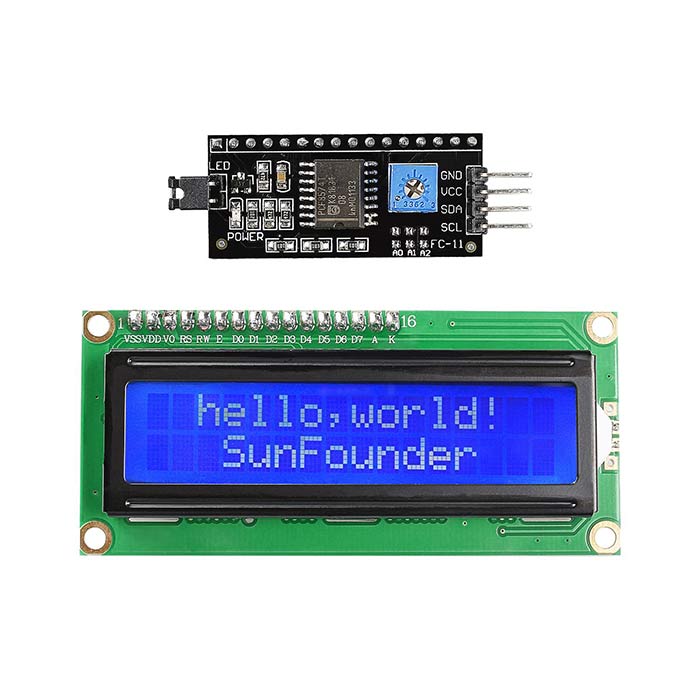
5.1 LCD Display Interface
5.1.1 What is an LCD?
LCD (Liquid Crystal Display) is an electronic display device used to show text, numbers, symbols, and other information generated by a microcontroller.
LCDs are widely used in Arduino projects because they are:
- Easy to use
- Low-cost
- Easy to read
- Available in different sizes
- Suitable for displaying sensor values and messages
A common Arduino LCD is the 16×2 LCD, which can display 16 characters on each of 2 rows.
5.1.2 Common LCD Types
- 16×2 LCD
It has:
- 16 columns
- 2 rows
- 32 character positions in total
- 20×4 LCD
It has:
- 20 columns
- 4 rows
- 80 character positions
- I2C LCD
An I2C LCD uses an I2C interface module attached to the back of the LCD. It significantly reduces the number of Arduino pins required.
Instead of many parallel connections, an I2C LCD normally uses:
|
I2C Pin |
Function |
|
VCC |
Power supply |
|
GND |
Ground |
|
SDA |
Serial Data |
|
SCL |
Serial Clock |
7.1.3 Basic LCD Pins
A standard 16×2 parallel LCD commonly has 16 pins.
Important pins include:
|
Pin |
Name |
Function |
|
1 |
VSS |
Ground |
|
2 |
VDD |
Power supply |
|
3 |
V0 |
Contrast adjustment |
|
4 |
RS |
Register Select |
|
5 |
RW |
Read/Write |
|
6 |
E |
Enable |
|
7–14 |
D0–D7 |
Data pins |
|
15 |
A |
Backlight |
|
16 |
K |
Backlight ground |
5.1.4 How an LCD Works with Arduino
The Arduino sends information to the LCD through its interface pins.
For example:
Sensor → Arduino → LCD → User
If a temperature sensor measures 25°C, the Arduino can process the value and send:
Temperature: 25 C
to the LCD.
5.1.5 Simple Arduino LCD Program
For an I2C LCD:
#include <Wire.h>
#include <LiquidCrystal_I2C.h>
LiquidCrystal_I2C lcd(0x27, 16, 2);
void setup() {
lcd.init();
lcd.backlight();
lcd.setCursor(0, 0);
lcd.print(“Hello Student”);
lcd.setCursor(0, 1);
lcd.print(“Arduino LCD”);
}
void loop() {
}
5.1.6 Important LCD Functions
|
Function |
Purpose |
|
lcd.init() |
Initializes the LCD |
|
lcd.backlight() |
Turns on the backlight |
|
lcd.print() |
Displays text or numbers |
|
lcd.setCursor() |
Sets the position of the cursor |
|
lcd.clear() |
Clears the display |
|
lcd.home() |
Moves cursor to the beginning |
5.1.7 Applications of LCD
LCDs are used in:
- Digital thermometers
- Electronic weighing machines
- Security systems
- Industrial control systems
- Arduino projects
- Digital clocks
- Vending machines
- Medical equipment
- IoT monitoring systems
Advantages of LCD
- Low cost
- Easy to program
- Low power consumption
- Good readability
- Available in many sizes
- Suitable for text and numerical information
Disadvantages of LCD
- Some types require many connection wires
- Limited graphics capability
- Viewing angle can be limited
- Backlight consumes additional power

You may also like

Nyereka Tech and Tumba College Explore Opportunities for Collaboration

The Launch of our IoT Innovation Hub

