


Arduino Communications
Arduino Communications
Introduction
- Introduction Serial Communication Modules
Serial communication is used to exchange data between the Arduino board and another serial device such as computers, displays, sensors and more.
Each Arduino board has at least one serial port. Serial communication occurs on digital pins 0 (RX) and 1 (TX) as well as via USB. Arduino supports serial communication through digital pins with the SoftwareSerial Library as well. This allows the user to connect multiple serial-enabled devices and leave the main serial port available for the USB.
- Types of Serial Communications
- Arduino UART GPS Modules
UART
Universal Asynchronous Receiver/Transmitter (UART). UART is a form of serial communication because data is transmitted as sequential bits. The wiring involved with setting up UART communication is very simple: one line for transmitting data (TX) and one line for receiving data (RX). As you may expect, the TX line is used to for the data to send device, and the RX line is used to receive data. Together the TX and RX lines of a device using serial communication form a serial port through which communication can occur.

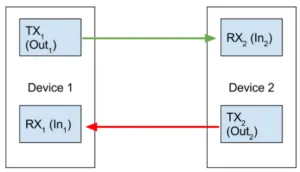


GPIO 0 and GPIO 1 are Serial RX and TX. Any GPIO pin can be used as Serial RX or TX with the Software Serial library
➢ GSM/GPRS Arduino Interfacing
The GPRS/GSM Shield provides you a way to use the GSM cell phone network to receive data from a remote location. The shield allows you to achieve this via any of the three methods:
● Short Message Service
● Audio
● GPRS Service


You may also like

Nyereka Tech and Tumba College Explore Opportunities for Collaboration

The Launch of our IoT Innovation Hub

