


C programming of Embedded system
Foundations of C and Embedded C programming
A. Introduction of C programming
C programming is high level language. Below are some advantages:
- Easy to learn
- Structured language
- It produces efficient programs
- It can handle low-level activities
- It can be compiled on a variety of computer platforms
B. Types, declarations, and expressions
I. Data types
These are basic data types used in C programming
| TYPE | DESCRIPTION |
| char | Typically, a single octet. This is an integer type |
| int | The most natural size of integer for the nature |
| float | A single precision floating point value |
| double | A double precision floating point value |
| void | Represents the absence of type |
A variable definition tells the compiler where and how much storage to create for the variable is known as declaration.
A variable definition specifies a data type and contains a list of one or more variables of that type as follows:
Syntax:
type variable_list;
A variable declaration provides assurance to the compiler that there exists a variable with the given type and name so that the compiler can proceed for further compilation without requiring the complete detail about the variable.
A variable declaration has its meaning at the time of compilation only, the compiler needs actual variable declaration at the time of linking the program.
A variable declaration is useful when you are using multiple files and you define your variable in one of the files which will be available at the time of linking the program. You will use the keyword extern to declare a variable at any place. Though you can declare a variable multiple times in your C program, it can be defined only once in a file, a function, or a block of code.
While declaring there are some reserved words that you can’t be allowed to use:
KEYWORDS:
| auto | else | Long | switch |
| break | enum | Register | typedef |
| case | extern | Return | union |
| char | float | Short | unsigned |
| const | for | Signed | void |
| continue | goto | Sizeof | volatile |
| default | if | static | while |
| do | int | struct | _Packed |
| double |
The expression is a combination of one or more operators, variables, and literals. Each expression evaluates to a value of a (data) type.
Expression could be as simple as sum of two numbers
sum = num1 + num2
| Algebraic Expression | C Expression |
| a x b – c | a * b – c |
| (m + n) (x + y) | (m + n) * (x + y) |
| (ab / c) | a * b / c |
| 3x2 +2x + 1 | 3*x*x+2*x+1 |
| (x / y) + c | x / y + c |
Examples of expression used in a program
main ()

    {
       float a, b, c x, y, z;
       a = 9;
       b = 12;
       c = 3;
       x = a – b / 3 + c * 2 – 1;
       y = a – b / (3 + c) * (2 – 1);
       z = a – ( b / (3 + c) * 2) – 1;
       printf ("x = %f",x);
       printf ("y = %f",y);
       printf ("z = %f",z);
} - Variables and constants
I. VARIABLES
A variable is nothing but a name given to a storage area that our programs can manipulate. Each variable in C has a specific type, which determines the size and layout of the variable’s memory; the range of values that can be stored within that memory; and the set of operations that can be applied to the variable.
The name of a variable can be composed of letters, digits, and the underscore character. It must begin with either a letter or an underscore. Upper and lowercase letters are distinct because C is case-sensitive.
It has two types:
- Local variable: which is declared every time you need to use it
- Global variable: Global variables are defined outside a function, usually on top of the program. Global variables hold their values throughout the lifetime of your program and they can be accessed inside any of the functions defined for the program.
#include <stdio.h>
    /* global variable declaration */
    int g;
    int main ()
    {
      /* local variable declaration */
      int a, b;
      /* actual initialization */
      a = 10;
      b = 20;
      g = a + b;
      printf ("value of a = %d, b = %d and g = %dn", a, b, g);
      return 0;
    }
II. CONSTANTS
Defining Constants There are two simple ways in C to define constants:
- Using #define preprocessor
- Using const keyword
The #define Preprocessor Given below is the form to use
Syntax:
#define identifier value
Example:
#define LENGTH 10 - Operators
An operator is a symbol that tells the compiler to perform specific mathematical or logical functions.
C language is rich in built-in operators and provides the following types of operators:
- Arithmetic Operators
- Relational Operators
- Logical Operators
- Bitwise Operators
- Assignment Operators
- Misc Operators
I. Arithmetic Operator
The following table shows all the arithmetic operators supported by the C language. Assume variable A holds 10 and variable B holds 20, then:
| Operator | Description | Example |
| + | Adds two operands. | A + B = 30 |
| – | Subtracts second operand from the first. | A – B = -10 |
| * | Multiplies both operands. | A * B = 200 |
| / | Divides numerator by de-numerator. | B / A = 2 |
| % | Modulus Operator and remainder of after an integer division. | B % A = 0 |
| ++ | Increment operator increases the integer value by one. | A++ = 11 |
| — | Decrement operator decreases the integer value by one. | A– = 9 |
II. Relational Operators
The following table shows all the relational operators supported by C. Assume variable A holds 10 and variable B holds 20, then:
| Operator | Description | Example |
| == | Checks if the values of two operands are equal or not. If yes, then the condition becomes true. | (A == B) is not true. |
| != | Checks if the values of two operands are equal or not. If the values are not equal, then the condition becomes true. | (A != B) is true. |
| > | Checks if the value of left operand is greater than the value of right operand. If yes, then the condition becomes true | (A > B) is not true. |
| < | Checks if the value of left operand is less than the value of right operand. If yes, then the condition becomes true. | (A < B) is true |
| >= | Checks if the value of left operand is greater than or equal to the value of right operand. If yes, then the condition becomes true. | (A >= B) is not true. |
| <= | Checks if the value of left operand is less than or equal to the value of right operand. If yes, then the condition becomes true. | (A <= B) is true. |
III. Logical Operators
Following table shows all the logical operators supported by C language. Assume variable A holds 1 and variable B holds 0, then:
| Operator | Description | Example |
| && | Called Logical AND operator. If both the operands are non-zero, then the condition becomes true. | (A && B) is false. |
| || | Called Logical OR Operator. If any of the two operands are non-zero, then the condition becomes true. | (A || B) is true. |
| ! | Called Logical NOT Operator. It is used to reverse the logical state of its operand. If a condition is true, then the Logical NOT operator will make it false. | !(A && B) is true. |
IV. Bitwise Operators
Bitwise operators work on bits and perform the bit-by-bit operations. The truth table for &, |, and ^ is as follows:
| p | q | p&q | p|q | p^q |
| 0 | 0 | 0 | 0 | 0 |
| 0 | 1 | 0 | 1 | 1 |
| 1 | 1 | 1 | 1 | 0 |
| 1 | 0 | 0 | 1 | 1 |
V. Assignment Operators
| Operator | Description | Example |
| = | Simple assignment operator. Assigns values from right side operands to left side operand. | C = A + B will assign the value of A + B to C |
| += | Add AND assignment operator. It adds the right operand to the left operand and assigns the result to the left operand. | C += A is equivalent to C = C + A |
| -= | Subtract AND assignment operator. It subtracts the right operand from the left operand and assigns the result to the left operand. | C -= A is equivalent to C = C – A |
| *= | Multiply AND assignment operator. It multiplies the right operand with the left operand and assigns the result to the left operand. | C *= A is equivalent to C = C * A |
| /= | Divide AND assignment operator. It divides the left operand with the right operand and assigns the result to the left operand. | C /= A is equivalent to C = C / A |
| %= | Modulus AND assignment operator. It takes modulus using two operands and assigns the result to the left operand. | C %= A is equivalent to C = C % A |
| <<= | Left shift AND assignment operator | C <<= 2 is same as C = C << 2 |
| >>= | Right shift AND assignment operator. | C >>= 2 is same as C = C >> 2 |
| &= | Bitwise AND assignment operator. | C &= 2 is same as C = C & 2 |
| ^= | Bitwise exclusive OR and assignment operator. | C ^= 2 is same as C = C ^ 2 |
| |= | Bitwise inclusive OR and assignment operator. | C |= 2 is same as C = C | 2 |
VI. Misc Operators
| Operator | Description | Example |
| sizeof() | Returns the size of a variable. | sizeof(a), where a is integer, will return 4. |
| & | Returns the address of a variable. | &a; returns the actual address of the variable. |
| * | Pointer to a variable. | *a; |
| ?: | Conditional Expression. | If Condition is true ? then value X : otherwise value Y |
- Control Statements
Decision-making structures require that the programmer specifies one or more conditions to be evaluated or tested by the program, along with a statement or statements to be executed if the condition is determined to be true, and optionally, other statements to be executed if the condition is determined to be false.
Shown below is the general form of a typical decision-making structure found in most of the programming languages:

A. if Statement
An if statement consists of a Boolean expression followed by one or more statements.
Syntax
The syntax of an ‘if’ statement in C programming language is:
if(boolean_expression)
    {
       /* statement(s) will execute if the boolean expression is true */
    }
If the Boolean expression evaluates to true, then the block of code inside the ‘if’ statement will be executed. If the Boolean expression evaluates to false, then the first set of code after the end of the ‘if’ statement (after the closing curly brace) will be executed. C programming language assumes any non-zero and non-null values as true and if it is either zero or null, then it is assumed as a false value.
B. if…else Statement
An if statement can be followed by an optional else statement, which executes when the Boolean expression is false.
Syntax
The syntax of an if…else statement in C programming language is:
if(boolean_expression)
    {
       /* statement(s) will execute if the boolean expression is true */
    }
    else
    {
      /* statement(s) will execute if the boolean expression is false */
    }
If the Boolean expression evaluates to true, then the if block will be executed, otherwise, the else block will be executed. C programming language assumes any non-zero and non-null values as true, and if it is either zero or null, then it is assumed as false value.
FLOW DIAGRAM

C. if…else if…else Statement
An if statement can be followed by an optional else if…else statement, which is very useful to test various conditions using single if…else if statement.
Syntax
The syntax of an if…else if…else statement in C programming language is:
if(boolean_expression 1)
    {
       /* Executes when the boolean expression 1 is true */
    }
    else if(boolean_expression 2)
    {
       /* Executes when the boolean expression 2 is true */
    }
    else if(boolean_expression 3)
    {
    /* Executes when the boolean expression 3 is true */
    }
    else
    {
       /* executes when the none of the above condition is true */
    }
D. Nested if Statements
You can use one if or else if statement inside another if or else if statement(s).
Syntax
The syntax for a nested if statement is as follows:
if( boolean_expression 1)
    {
       /* Executes when the boolean expression 1 is true */
       if(boolean_expression 2)
       {
          /* Executes when the boolean expression 2 is true */
       }
    }
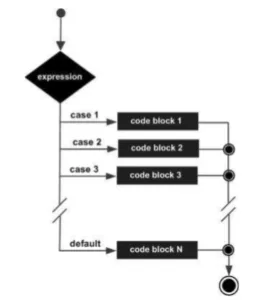
E. Switch Statement
A switch statement allows a variable to be tested for equality against a list of values. Each value is called a case, and the variable being switched on is checked for each switch case.
Syntax
switch(expression){
        case constant-expression:
        statement(s);
        break; /* optional */
        case constant-expression:
        statement(s);
        break; /* optional */
        /* you can have any number of case statements */
        default: /* Optional */
        statement(s);
    }
The syntax for a switch statement in C programming language is as follows:
FLOW DIAGRAM

Example of how SWITCH is used:
#include <stdio.h>
    int main ()
    {
       /* local variable definition */
       char grade = 'B';
       switch(grade)
       {
       case 'A' :
            printf("Excellent!n" );
           break;
       case 'B' :
       case 'C' :
          printf("Well donen" );
          break;
       case 'D' :
          printf("You passedn" );
          break;
       case 'F':
          printf("Better try againn");
          break;
       default :
          printf("Invalid graden");
       }
       printf("Your grade is %cn", grade);
       return 0;
} - LOOPS
You may encounter situations when a block of code needs to be executed several times. In general, statements are executed sequentially: The first statement in a function is executed first, followed by the second, and so on.
Programming languages provide various control structures that allow for more complicated execution paths.
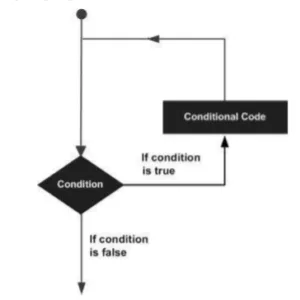
A loop statement allows us to execute a statement or group of statements multiple times. Given below is the general form of a loop statement in most of the programming languages
A. while Loop
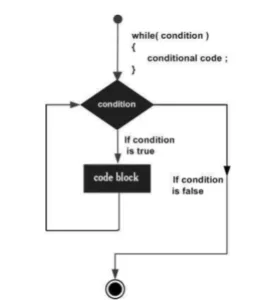
A while loop in C programming repeatedly executes a target statement as long as a given condition is true.
Syntax
The syntax of a while loop in C programming language is:
while(condition)
    {
       statement(s);
    }
FLOW DIAGRAM
Example
#include <stdio.h>
    int main ()
    {
       /* local variable definition */
       int a = 10;
       /* while loop execution */
       while(a < 20)
       {
          printf("value of a: %dn", a);
          a++;
       }
       return 0;
    }
When the above code is compiled and executed, it produces the following result:
value of a: 10
value of a: 11
value of a: 12
value of a: 13
value of a: 14
value of a: 15
value of a: 16
value of a: 17
value of a: 18
value of a: 19
B. for Loop
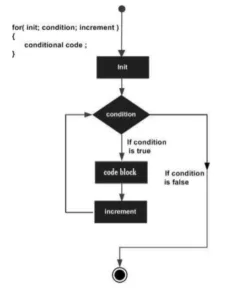
A for loop is a repetition control structure that allows you to efficiently write a loop that needs to execute a specific number of times.
Syntax
for ( init; condition; increment)
    {
       statement(s);
    }
FLOW DIAGRAM
Example
#include <stdio.h>
    int main ()
    {
       /* for loop execution */
       for( int a = 10; a < 20; a = a + 1 )
       {
          printf("value of a: %dn", a);
        }
        return 0;
    }
When the above code is compiled and executed, it produces the following result:
value of a: 10
value of a: 11
value of a: 12
value of a: 13
value of a: 14
value of a: 15
value of a: 16
value of a: 17
value of a: 18
value of a: 19
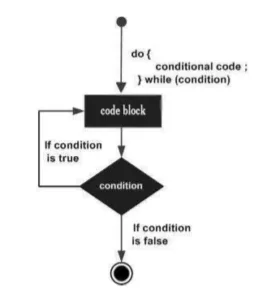
C. do…while Loop
Unlike for and while loops, which test the loop condition at the top of the loop, the do…while loop in C programming checks its condition at the bottom of the loop.
A do…while loop is similar to a while loop, except the fact that it is guaranteed to execute at least one time.
Syntax
do
    {
       statement(s);

    }
    while( condition );
FLOW DIAGRAM
Example:
#include <stdio.h>
    int main ()
    {
       /* local variable definition */
       int a = 10;
       /* do loop execution */
       do
       {
           printf("value of a: %dn", a);
           a = a + 1;
       }
    while( a < 20 );
       return 0;
    }
When the above code is compiled and executed, it produces the following result:
value of a: 10
value of a: 11
value of a: 12
value of a: 13
value of a: 14
value of a: 15
value of a: 16
value of a: 17
value of a: 18
value of a: 19
There is other control statement:
| Control Statement | Description |
| break statement | Terminates the loop or switch statement and transfers execution to the statement immediately following the loop or switch. |
| continue statement | Causes the loop to skip the remainder of its body and immediately retest its condition prior to reiterating. |
| goto statement | Transfers control to the labeled statement. |
- ARRAYS
I. What is an ARRAY?
An array is used to store a collection of data, but it is often more useful to think of an array as a collection of variables of the same type.
Instead of declaring individual variables, such as number0, number1, …, and number99, you declare one array variable such as numbers and use numbers [0], numbers [1], and …, numbers [99] to represent individual variables. A specific element in an array is accessed by an index.
All arrays consist of contiguous memory locations. The lowest address corresponds to the first element and the highest address to the last element.
I. DECLARING ARRAYS
To declare an array in C, a programmer specifies the type of the elements and the number of elements required by an array as follows:
type arrayName [ arraySize ];
This is called a single-dimensional array. The arraySize must be an integer constant greater than zero and type can be any valid C data type.
For example, to declare a 10-element array called balance of type double, use this statement:
double balance[10];
Initializing Arrays
You can initialize an array in C either one by one or using a single statement as follows:
double balance[5] = {1000.0, 2.0, 3.4, 7.0, 50.0};
    or
    double balance[] = {1000.0, 2.0, 3.4, 7.0, 50.0}
D. MULTIDIMENSIONAL ARRAYS
C programming language allows multidimensional arrays. Here is the general form of a multidimensional array declaration:
Syntax:
type name[size1][size2]...[sizeN];
    // For example, the following declaration creates a three-dimensional integer array:
    int threedim[5][10][4];
Two-dimensional Arrays
The simplest form of multidimensional array is the two-dimensional array. A two-dimensional array is, in essence, a list of one-dimensional arrays. To declare a two-dimensional integer array of size [x][y], you would write something as follows:
Syntax:
type arrayName [ x ][ y ]; Where type can be any valid C data type and arrayName will be a valid C identifier. A two-dimensional array can be considered as a table which will have x number of rows and y number of columns. A two-dimensional array a, which contains three rows and four columns can be shown as follows
Initializing Two-Dimensional Arrays
Multidimensional arrays may be initialized by specifying bracketed values for each row.
Following is an array with 3 rows and each row has 4 columns.
int a[3][4] = {
     {0, 1, 2, 3} ,   /*  initializers for row indexed by 0 */
     {4, 5, 6, 7} ,   /*  initializers for row indexed by 1 */
     {8, 9, 10, 11}   /*  initializers for row indexed by 2 */
    };
The nested braces, which indicate the intended row, are optional.
The following initialization is equivalent to the previous example:
int a[3][4] = {0,1,2,3,4,5,6,7,8,9,10,11};
Accessing Two-Dimensional Array Elements
An element in a two-dimensional array is accessed by using the subscripts, i.e., row index and column index of the array. For example:
int val = a[2][3];
The above statement will take the 4th element from the 3rd row of the array. You can verify it in the above figure. Let us check the following program where we have used a nested loop to handle a two-dimensional array:
#include <stdio.h>
    int main ()
    {
       /* an array with 5 rows and 2 columns*/
       int a[5][2] = { {0,0}, {1,2}, {2,4}, {3,6},{4,8}};
       int i, j;

       /* output each array element's value */
       for ( i = 0; i < 5; i++ )
       {
          for ( j = 0; j < 2; j++ )
          {
             printf("a[%d][%d] = %dn", i,j, a[i][j] );
          }
       }
       return 0;
    }
When the above code is compiled and executed, it produces the following result:
a[0][0]: 0 a[0][1]: 0
a[1][0]: 1 a[1][1]: 2
a[2][0]: 2 a[2][1]: 4
a[3][0]: 3 a[3][1]: 6
a[4][0]: 4 a[4][1]: 8
- POINTER
A pointer is a variable whose value is the address of another variable, i.e., direct address of the memory location. Like any variable or constant, you must declare a pointer before using it to store any variable address. The general form of a pointer variable declaration is:
Syntax:
type *var-name;
The asterisk * used to declare a pointer. the asterisk is being used to designate a variable as a pointer. Take a look at some of the valid pointer declarations:
int *ip; /* pointer to an integer */
double *dp; /* pointer to a double */
float *fp; /* pointer to a float */
char *ch /* pointer to a character */
How to Use Pointers?
#include <stdio.h>
    int main ()
    {
       int  var = 20;    /* actual variable declaration */
       int  *ip;         /* pointer variable declaration */
       ip = &var;    /* store address of var in pointer variable*/
       printf("Address of var variable: %xn", &var  );
       /* address stored in pointer variable */
       printf("Address stored in ip variable: %xn", ip );
       /* access the value using the pointer */
       printf("Value of *ip variable: %dn", *ip );
       return 0;
    }
When the above code is compiled and executed, it produces the following result:
Address of var variable: bffd8b3c
Address stored in ip variable: bffd8b3c
Value of *ip variable: 20
- STRINGS
Strings are actually one-dimensional array of characters terminated by a null character ‘’.
The following declaration and initialization create a string consisting of the word “Hello”.
Example:
char greeting[6] = {'H', 'e', 'l', 'l', 'o', ''};
    or
    char greeting[] = "Hello";
#include <stdio.h>
int main ()
{
char greeting[6] = {'H', 'e', 'l', 'l', 'o', ''};
printf("Greeting message: %sn", greeting );
return 0;
} Functions used in STRING
| S.N | Function & Purpose |
| 1 | strcpy(s1, s2); Copies string s2 into string s1. |
| 2 | strcat(s1, s2); Concatenates string s2 onto the end of string s1. |
| 3 | strlen(s1); Returns the length of string s1. |
| 4 | strcmp(s1, s2); Returns 0 if s1 and s2 are the same; less than 0 if s1<s2; greater than 0 if s1>s2. |
| 5 | strchr(s1, ch); Returns a pointer to the first occurrence of character ch in string s1. |
| 6 | strstr(s1, s2); Returns a pointer to the first occurrence of string s2 in string s1. |
The following example uses some of the above-mentioned functions:
#include <stdio.h>
    #include <string.h>
    int main ()
    {
       char str1[12] = "Hello";
       char str2[12] = "World";
       char str3[12];
       int  len ;
       /* copy str1 into str3 */
       strcpy(str3, str1);
       printf("strcpy( str3, str1) :  %sn", str3 );
       /* concatenates str1 and str2 */
       strcat( str1, str2);
       printf("strcat( str1, str2):   %sn", str1 );
       /* total lenghth of str1 after concatenation */
       len = strlen(str1);
       printf("strlen(str1) :  %dn", len );
       return 0;
    }
When the above code is compiled and executed, it produces the following result:
strcpy( str3, str1) : Hello
strcat( str1, str2): HelloWorld
strlen(str1) : 10
- FUNCTIONS
A function is a group of statements that together perform a task. Every C program has at least one function, which is main(), and all the most trivial programs can define additional functions.
A function declaration tells the compiler about a function’s name, return type, and parameters. A function definition provides the actual body of the function.
Defining a Function
The general form of a function definition in C programming language is as follows:
return_type function_name( parameter list)
    {
       body of the function
    }
A function definition in C programming consists of a function header and a function body. Here are all the parts of a function:
- Return Type: A function may return a value. The return_type is the data type of the value the function returns. Some functions perform the desired operations without returning a value. In this case, the return_type is the keyword void.
- Function Name: This is the actual name of the function. The function name and the parameter list together constitute the function signature.
- Parameters: A parameter is like a placeholder. When a function is invoked, you pass a value to the parameter. This value is referred to as actual parameter or argument. The parameter list refers to the type, order, and number of the parameters of a function. Parameters are optional; that is, a function may contain no parameters.
- Function Body: The function body contains a collection of statements that define what the function does.
Example
Given below is the source code for a function called max (). This function takes two parameters num1 and num2 and returns the maximum value between the two:
/* function returning the max between two numbers */
    int max (int num1, int num2)
    {
       /* local variable declaration */
       int result;
       if (num1 > num2)
          result = num1;
          else
          result = num2;
       return result;
    }
Function Arguments
If a function is to use arguments, it must declare variables that accept the values of the arguments. These variables are called the formal parameters of the function.
Formal parameters behave like other local variables inside the function and are created upon entry into the function and destroyed upon exit.
While calling a function, there are two ways in which arguments can be passed to a function:
CALL TYPE
Call by value: This method copies the actual value of an argument into the formal parameter of the function. In this case, changes made to the parameter inside the function have no effect on the argument.
Call by reference: This method copies the address of an argument into the formal parameter. Inside the function, the address is used to access the actual argument used in the call. This means that changes made to the parameter affect the argument.

You may also like

Nyereka Tech and Tumba College Explore Opportunities for Collaboration

The Launch of our IoT Innovation Hub

